
​ iPhones and AirPods Are Now Being Used as Spying Devices
  • Home
    • News
    • Entertainment
    • The Baller Alert Show
    • Baller Alert Lists
    • Baller Alert Exclusives
    • Ballerific Music
    • That’s Baller
    • Fashion
    • Metaverse
    • Tech
    • Lifestyle
    • Sports
    • Op-Ed
    • Travel
    • Health
  • EVENTS
  • Videos
  • Shop
  • ChatBot
  • About
  • Political News
  • en español
No Result
View All Result
  • Home
    • News
    • Entertainment
    • The Baller Alert Show
    • Baller Alert Lists
    • Baller Alert Exclusives
    • Ballerific Music
    • That’s Baller
    • Fashion
    • Metaverse
    • Tech
    • Lifestyle
    • Sports
    • Op-Ed
    • Travel
    • Health
  • EVENTS
  • Videos
  • Shop
  • ChatBot
  • About
  • Political News
  • en español
No Result
View All Result
Baller Alert
No Result
View All Result

iPhones and AirPods Are Now Being Used as Spying Devices

Regan by Regan
December 25, 2021
in News
Reading Time: 2 mins read
iphone spying device

iphone spying device

Did you know iPhones and AirPods can be used to listen to other people’s conversations without them knowing? Such iPhone spying is really just a sneaky use of the Live Listen feature built into iOS.

According to “CultofMac.com,” here’s what you can do if you want to use your iPhone to spy on someone.  And what to watch out for if you don’t want to fall victim to anyone using iPhone to spy on you.

First off, let’s make it clear that it’s a violation of federal and state laws. It is electronic eavesdropping, and that is a crime.

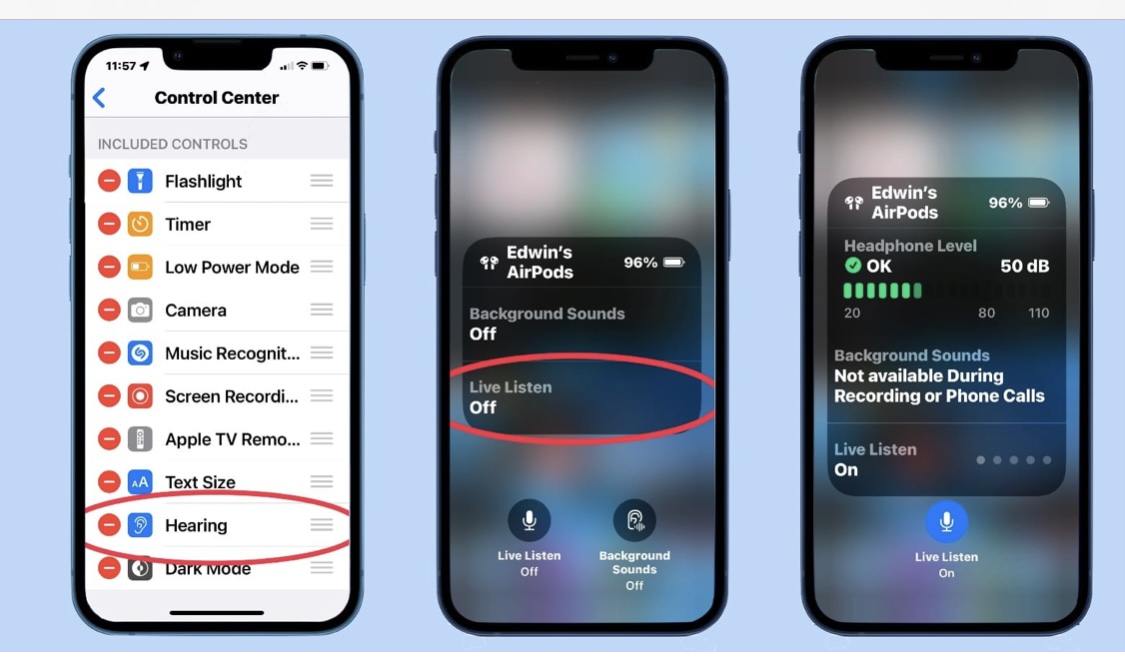
The “Live Listen” useful accessibility feature in iOS allows users to stream live audio from their iPhone’s microphone directly to their AirPods. It’s meant to help you to better hear the person you’re talking to.

For instance, if you’re having trouble hearing a conversation in a crowded space, you can place your iPhone between you and the person you’re talking with, pop in your AirPods, and turn on Live Listen. You should then be able to hear the other person more clearly.

You can also use it in cases where you get up and walk away, leaving your iPhone behind like a bug, it will continue to stream the audio around it to your AirPods, allowing you to hear what’s going on after you’ve left the area.

Your iPhone doesn’t have to be on, for this feature to work. To activate the Live Listen feature, go to Settings > Control Center on your iPhone. Then, check to see if Hearing is listed under Included Controls. If it isn’t, tap the green + iconnext to it.

Previous Post

Tesla To Disable Car Games While Vehicles Are Moving

Next Post

Regifting Etiquette: 8 Tips To Giving Away Unwanted Christmas Presents

Regan

Regan

Blogging since 2006, Regan has written for numerous online publications including YoRaps.com, BallerAlert.com and her own online labor of love Honeygrip.com. In 2010, as her alter-ego Honeygrip, Regan was the gossip correspondent for controversial radio personalities Star & Bucwild. Each experience not only thickened her skin but it introduced her to a new passion, the new realm of ‘social media’.

Leave a Reply Cancel reply

Your email address will not be published. Required fields are marked *

Download Baller Alert App

Chat with Baller Alert Bot
No Result
View All Result
  • Home
    • News
    • Entertainment
    • The Baller Alert Show
    • Baller Alert Lists
    • Baller Alert Exclusives
    • Ballerific Music
    • That’s Baller
    • Fashion
    • Metaverse
    • Tech
    • Lifestyle
    • Sports
    • Op-Ed
    • Travel
    • Health
  • EVENTS
  • Videos
  • Shop
  • ChatBot
  • About
  • Political News
  • en español